Instagram’s New AI ‘Restyle’ Tool – Everything You Need to Know
Have you ever taken a photo or video for your brand and felt like something was missing?
Maybe the background wasn’t right, or the lighting looked dull, or the whole picture just didn’t match your vibe.
We’ve all been there.
Now, imagine being able to fix all that — not with complicated editing software, not with Photoshop — but just by telling Instagram what you want.
That’s exactly what the new Instagram AI “Restyle” tool does.
It listens to your words, understands what you mean, and changes your photo or video according to your idea.
Sounds crazy, right?
But it’s real — and it’s already rolling out inside Instagram.
What is the AI Restyle Tool from Instagram?
The Restyle tool is basically an AI photo editor inside Instagram.
You upload or select a photo and type a short text prompt — something like:
- “Make this look like a watercolor painting”
- “Add cinematic lighting”
- “Turn this photo into a film look”
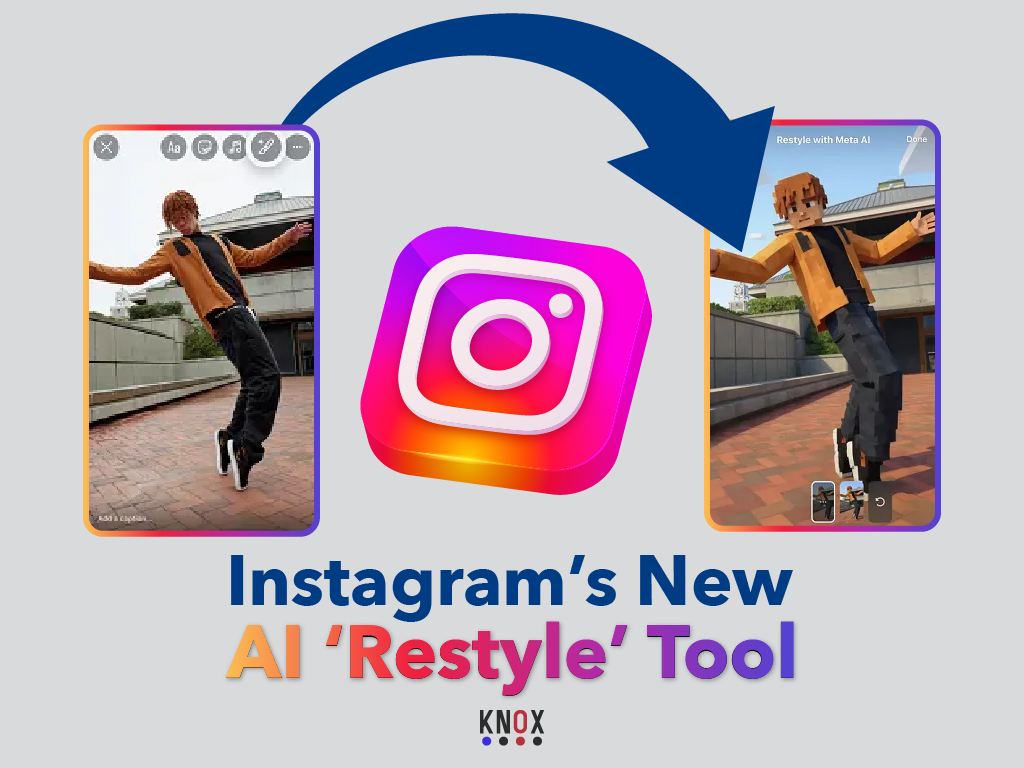
And, in just a few seconds, the AI changes the complete visual style of the photo, keeping the subject the same.
It uses generative AI, meaning it does not just add filters; instead, it visually recreates the picture per your prompt.
So, it’s different from the usual filters on Instagram. Those filters only vary in color and brightness.
Restyle, in fact, reimagines the picture based on your description.
Meta says the tool is trained to understand creative language — so you can describe the “look” you want, and it tries to make that style appear.
How the Restyle Tool Works
You don’t need any design skill to use it. Here’s the basic process:
- Open Instagram.
- Choose a photo or upload one.
- Tap on “Edit with AI” or “Restyle” if you have access to the features.
- Type your text prompt, for example, “90s film photo” or “professional studio look.”
- It processes your request through AI and gives you a new version of the image.
- You can compare the before and after.
- You can accept it, change the prompt, or go back to the original.
Everything happens right inside of Instagram, with no additional app required.
On the point of accessibility, it is good: it’s for everyone, not just creators or professionals.
Availability and Access
The AI Restyle tool is still in the testing phase.
It is available to a limited number of users in select countries, mainly in the United States and a few other regions.
Meta said it will expand gradually once feedback and safety checks are done.
The rollout is part of Instagram’s larger plan to bring Meta AI features into its main platforms: Facebook, Instagram, and WhatsApp.
So, if you don’t see the Restyle option yet, don’t worry — it’s not just you.
Although it hasn’t been fully released globally, it’s coming soon for more users including creators and business accounts.
Key Features of Instagram’s AI Restyle Tool
Let’s break down what this tool can actually do:
1. Text-to-Style Editing
This is the main feature: you just describe how you want your photo to look, and AI restyles it.
2. Several Styling Variants
You can use creative prompts, for example – “fantasy art,” “retro vibe,” “film tone,” “professional lighting,” etc.
It’s flexible and responds differently depending on how you phrase your request.
3. Built-in Comparison
Instagram allows the “before and after” to be seen side by side.
You can either post the edited version or keep the original.
4. Fast Processing
Restyle provides results in seconds, unlike third-party applications that take minutes.
That’s possible because Meta’s AI runs on its own servers integrated into the app.
4. Fast 5. No Extra App or Plugin Needed
It’s baked right into the interface of Instagram, which makes it easy and accessible for normal users.
Why Instagram's AI Restyle Tool Matters for Creators
There are several practical benefits that make Restyle a strong update:
1. Saves Time
You don’t need to use Lightroom or Photoshop to make quick changes in style.
Everything happens in-app.
2. Easy for Beginners
No technical expertise required: even if you’ve never edited a photo in your life, you can get stylish results just by typing what you want.
3. Great for Creators and Small Businesses
It can help small business pages, like cafes and clothing brands, or even influencer accounts, create professional posts quickly without needing to hire a designer.
4. Encourages Creativity
You can experiment with looks and styles you wouldn’t normally try.
It’s like having an AI art assistant inside your phone.
5. Free (for now)
Meta has not introduced any cost for this yet.
Currently, it’s available in the test version for the users who have access.
The Issues and Limitations
Of course, nothing is perfect, and that includes Restyle.
There are a few honest downsides and concerns users have noticed:
Not Always Accurate
Sometimes, the AI doesn’t understand your prompt correctly.
You might say “soft natural light,” and it makes the photo too bright or fake-looking.
Loss of Realism
Because it reproduces visuals, the skin of faces or backgrounds sometimes looks a bit fake.
That can be a problem if authenticity in your photos is what you want.
Limited Prompts (for now)
You can’t type long or complex sentences; the AI still works best with short, clear descriptions.
Limitations of Accessibility
As the rollout is still limited, not everyone can try it yet.
That means many users have to wait until it’s available in their country.
Privacy and Copyright Questions
Posing similar questions like other generative AI systems:
Where does it get the training data? And secondly, how does it actually process faces?
Meta has asserted the system follows all responsible AI guidelines, yet people still want transparency.
The Connection with Other Meta AI Tools
Restyle isn’t the only AI tool being added to Instagram.
Along with that, Meta also introduced “Backdrop” — another AI feature that changes the background of a photo.
You can enter something like “place me in front of the Eiffel Tower” or “add sunset clouds,” and it produces that scene.
Both are powered by Meta’s internal AI system and also connect to the company’s new AI assistant, “Meta AI.”
This means Instagram is heading toward becoming a smart content creation platform, not just a social media app.
Accessibility and User Safety
Meta says that all AI-generated or AI-edited photos will carry a visible label attributing them as having been “Imagined with AI.”
This label is used to help identify which images have been artificially generated.
That’s important because it keeps things transparent and won’t blur the line between actual and AI-tampered images.
Accessibility-wise, the feature is designed for mobile users, so heavy devices are not needed.
It works for both Android and iOS, as long as your app is updated and you are in a supported region.
What It Means for Social Media Marketing
Here are some of the ways that people are actually using Restyle during the test phase:
- Content Creators: for adding cinematic or artistic effects to selfies or travel photos.
- Small Brands: to create consistent style themes for product photos.
- Marketers: will want to test visual styles before planning campaigns.
- Casual Users: just for fun — experimenting with prompts like “comic book style” or “retro 80s.”
It’s a mix of professional and playful use.
The Honest Summary
The AI Restyle tool on Instagram is a powerful addition; it’s creative.
It helps people edit photos quickly, test new styles, and enhance visual content without effort. Simple, integrated, and easy to learn. It is not perfect, but: It sometimes misunderstands prompts, sometimes the results look a bit fake, and it’s still not available to everyone.
Let’s be real, it’s not a substitute for real photography or editing skill; it’s a shortcut that makes creative expression faster and more accessible. And that’s probably the point.
Instagram wants to give the power of creating good-looking content to everyone, not just professionals.
So, overall, the AI Restyle tool is a good move. It has some clear benefits, a few limitations, and it is still developing.
But it does show how social media is changing — from just sharing moments, to creating them with the help of AI.
Written by KNOX
Your expert social media marketing agency NYC, delivering powerful digital marketing solutions for brands that want to stand out. Contact us today.